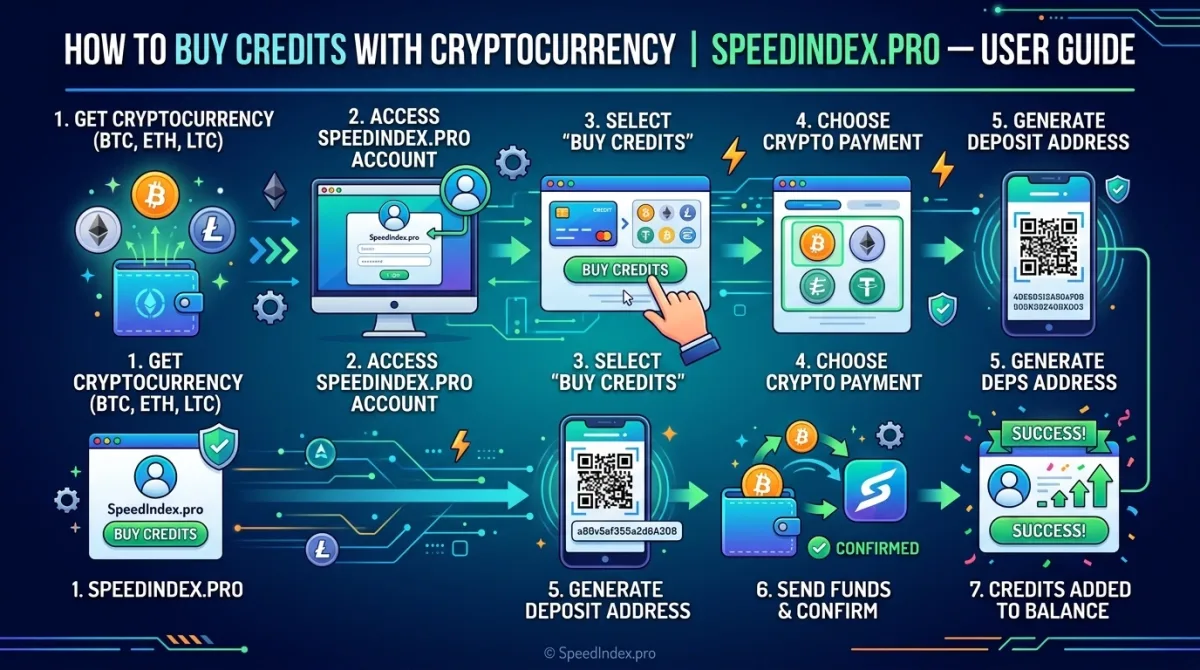
SpeedIndex.pro uses Google's official Indexing API to get your URLs discovered by Google within minutes. To submit URLs, you need credits — and we make it easy to purchase them using cryptocurrency. This guide walks you through every step of the process.
Credits are simple: 1 credit = 1 URL submitted. Credits never expire and there are no monthly fees — buy what you need and use it whenever.
Accepted Cryptocurrencies
SpeedIndex.pro accepts the following cryptocurrencies:
• Bitcoin (BTC) — The most widely used cryptocurrency. Confirmations take 10–30 minutes.
• USDT on TRC-20 (Tron network) — Fast and low network fees. Usually confirms in under 5 minutes. Recommended.
• USDT on ERC-20 (Ethereum network) — Stable value. Confirm times vary — typically 5–20 minutes.
• Ethereum (ETH) — Widely held. Processed on the Ethereum network.
• USDC — USD-pegged stablecoin. Predictable value at checkout.
Important: When sending USDT, always make sure the network selected in your wallet (TRC-20 or ERC-20) matches the network shown on the SpeedIndex payment page. Sending on the wrong network may result in permanent loss of funds.
Available Credit Packages
Choose the plan that best fits your needs:
• Starter — $10 USD (approx. PKR 2,500) | 50 URL credits. Perfect for beginners and small projects.
• Pro — $20 USD (approx. PKR 5,000) | 100 URL credits. Best value for regular users. Includes custom API key slot.
• Enterprise — $50 USD (approx. PKR 12,500) | 250 URL credits. High-volume plan for agencies and power users. Priority support included.
Step-by-Step: How to Buy Credits with Crypto
Step 1: Create or Log In to Your Account
Visit speedindex.pro and sign up for a free account — no credit card required. Registration takes under 60 seconds. Simply enter your email, set a password, and verify your email address. If you already have an account, click Sign In.
Step 2: Go to the Pricing Page
Once logged in, navigate to the Pricing section from the main menu or visit speedindex.pro/#pricing. Review the three credit packages (Starter, Pro, Enterprise) and click Choose Plan on the one you want.
Step 3: Select Cryptocurrency as Your Payment Method
On the checkout or payment page, select the Pay with Cryptocurrency option. A list of accepted coins will appear. Choose the cryptocurrency you hold — for example, USDT (TRC-20) is recommended for its speed and low fees.
Step 4: Send the Exact Amount to the Wallet Address
A unique deposit wallet address and QR code will be displayed on screen. Open your crypto wallet app (e.g. Trust Wallet, Binance, MetaMask, OKX) and:
• Scan the QR code, or copy and paste the wallet address manually.
• Enter the exact amount shown on the SpeedIndex payment page.
• Select the correct network (must match what SpeedIndex shows — e.g. TRC-20).
• Confirm and send the transaction.
Never send to a different network than what is shown. Always double-check the wallet address before confirming. Crypto transactions are irreversible.
Step 5: Wait for Blockchain Confirmation
After sending, the blockchain needs to confirm your transaction. Typical wait times:
• USDT on TRC-20 — Usually under 5 minutes
• Ethereum / ERC-20 USDT — Typically 5–20 minutes
• Bitcoin (BTC) — Usually 10–30 minutes (requires 1–3 confirmations)
Step 6: Credits Appear in Your Dashboard
Once the transaction is confirmed on the blockchain, your credits are added to your SpeedIndex account automatically. You will see the updated balance in your dashboard — ready to use immediately for URL submissions.
Frequently Asked Questions
What if my credits have not appeared after 30 minutes?
First, find your transaction hash (TXID) in your wallet app and check it on a block explorer (e.g. tronscan.org for TRC-20, etherscan.io for ERC-20, blockchain.com for BTC) to confirm it was broadcast and confirmed. If the transaction is confirmed on-chain but credits have not appeared, email business@speedindex.pro with your account email and your TXID. The support team will manually verify and credit your account.
Do credits expire?
No. Credits purchased on SpeedIndex.pro never expire. There are no subscriptions, no monthly fees, and no time limits. Buy once, use whenever you need.
Which wallet apps can I use?
Any wallet that supports your chosen coin and network. Popular options include Trust Wallet, MetaMask (ETH / ERC-20), Binance app, Coinbase Wallet, OKX, and TronLink (TRC-20 USDT). You can also send directly from a crypto exchange like Binance or OKX if it supports withdrawals to the required network.
Can I get a refund on a crypto payment?
Please review the Refund Policy at speedindex.pro/refund.php before making a payment. Blockchain transactions are irreversible, which limits refund options for crypto payments. If you have any concerns, contact support before completing your payment.
Is there a minimum purchase amount?
The minimum is the Starter pack at $10 USD (50 credits). There is no hard maximum. For bulk credits or custom enterprise arrangements, contact the team at business@speedindex.pro.
Is paying with crypto safe?
Yes. SpeedIndex uses Google's official Indexing API and follows best practices for security. Your crypto payment is processed on the public blockchain — fully transparent and verifiable. Always confirm you are on the official speedindex.pro website before sending any payment.
Need Help?
If you have any questions or issues with your crypto payment, our team is ready to assist:
• Email: business@speedindex.pro
• Website: speedindex.pro
• Contact page: speedindex.pro/contact.php